Protecting your location privacy with location guard
Location Guard is an open-source browser extension developed by Kostas Chatzikokolakis that helps users hide geographic location from websites. It addresses concerns about invasive geolocation tracking by masking the real location reported via JavaScript-based methods. Users benefit from increased control over their online privacy by preventing websites from accurately pinpointing their position while browsing. The extension offers a straightforward solution for anyone looking to manage how their location data is shared during web sessions.
A flexible approach to masking location data
Location Guard operates by manipulating the location information reported through the JavaScript geolocation API. It achieves this primarily by adding a controlled amount of random noise to the user’s true coordinates, which prevents precise identification of the actual location. Alternatively, users have the option to specify a fixed, fake location for consistent masking. This dual approach allows for customization depending on whether users prefer variability or consistency in location reporting.
Protection focused on JavaScript geolocation
The extension’s protection applies exclusively to the JavaScript-based geolocation methods websites use to request precise location data. It does not provide any defense against IP-based geolocation techniques, which rely on the user’s IP address rather than browser-based location data. Because of this limitation, users who require comprehensive protection against all forms of location tracking should consider using Location Guard alongside a VPN to address IP-level tracking.
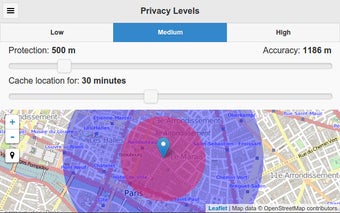
Random noise can be configurable with three predefined privacy levels: High, Medium, and Low. Higher levels add more noise, creating a larger protection radium but less useful location data for the website. Users can set different privacy levels or a fixed location for specific websites, allowing users to provide an accurate location to trusted services while spoofing or generalizing their location for other sites.
Maintaining location privacy during web browsing
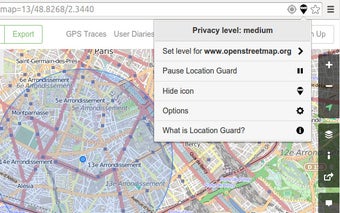
With an interface designed for simplicity and accessibility, Location Guard allows users to quickly configure their location privacy settings globally or on a per-website basis. The user interface is accessed by clicking the extension icon in the browser toolbar, which displays a small marker to indicate if it is currently active on the current website.
Balanced and practical for geolocation privacy
Location Guard targets privacy-conscious users who want to avoid accurate geolocation by websites requesting location information via JavaScript APIs. By either introducing randomized noise or allowing a set fake location, it prevents sites from accessing reliable position data. Given it does not cover IP detection, combining it with other tools for full privacy coverage is necessary. As a free extension available on the Chrome platform, it offers a focused solution for controlling location sharing without unverified extras.